Enterprises are spending more on AI than ever. Returns on that spending remain elusive in most functions. And corporate presentations - the documents that carry your analysis, your recommendations, and your reputation to clients - sit in one of the widest gaps between AI investment and AI productivity.
This post examines the data, explains why the gap exists, and describes how we think it should be closed.
The numbers: massive adoption, missing productivity
By Q1 2026, AI adoption in large enterprises is no longer a question. According to KPMG's own AI Quarterly Pulse Survey, 54% of organisations are actively deploying AI agents in core operations - up from just 12% in 2024. U.S. organisations project average AI spending of $207 million over the next 12 months, nearly double the prior year. Globally, 74% of leaders say AI will remain a top investment priority even during a recession. And yet only 8% of organisations already see in ROI in the survey.
The numbers from other research houses tell the same story. Presenc AI reports that 78% of Global 2000 companies now have at least one AI workload in production. iEnable puts the broader figure at 87% of enterprises with some form of AI adoption in 2026.
But here is the other side: most of this investment has not yet translated into measurable productivity gains.
A survey of nearly 6,000 executives across the US, UK, Germany, and Australia found that more than 80% detected no discernible impact from AI on employment or productivity, despite 69% of businesses using some form of AI.
Workday research reveals what they call the "AI productivity paradox": 85% of employees report saving one to seven hours per week using AI, but nearly 40% of those savings are lost to rework - fixing errors, rewriting content, verifying outputs. Only 14% of employees consistently achieve clear, positive net outcomes.
Even KPMG's own survey acknowledges this tension. While investment surges, 65% of leaders cite difficulty scaling AI use cases (up from 33% just one quarter earlier), and 62% identify workforce skills gaps as top barriers to demonstrating ROI. The report is explicit: execution, not capital or technology, now determines outcomes.
Why corporate presentations remain an AI dead zone
If AI productivity gains are hard to achieve generally, the problem is especially acute in one area that touches every professional services firm, every fund manager, and every consulting practice: corporate presentations.
The documents your teams produce - client reports, board decks, quarterly reviews, audit summaries, investment pitches - are not generic content. They carry precise data, institutional formatting, and brand standards that your clients expect. They are the final deliverable that represents months of analytical work.
Yet despite the proliferation of AI tools, the way these decks get made has barely changed. The reason is structural: the current generation of AI presentation tools falls into two categories, and both have fundamental problems for enterprise use.
Category 1: Web-native AI generators
Tools that build slides in their own web-based design environment and then export to PowerPoint. This category includes well-known names with millions of users.
The problem is the export. These tools translate fluid web blocks into absolute PowerPoint coordinates - a conversion, not a clone. Elements get flattened. Fonts are substituted. Layouts shift. Charts become static images that nobody can edit. Independent reviewers report analysts spending 45 minutes reformatting a single export, which often negates the time saved by generating the deck in the first place.
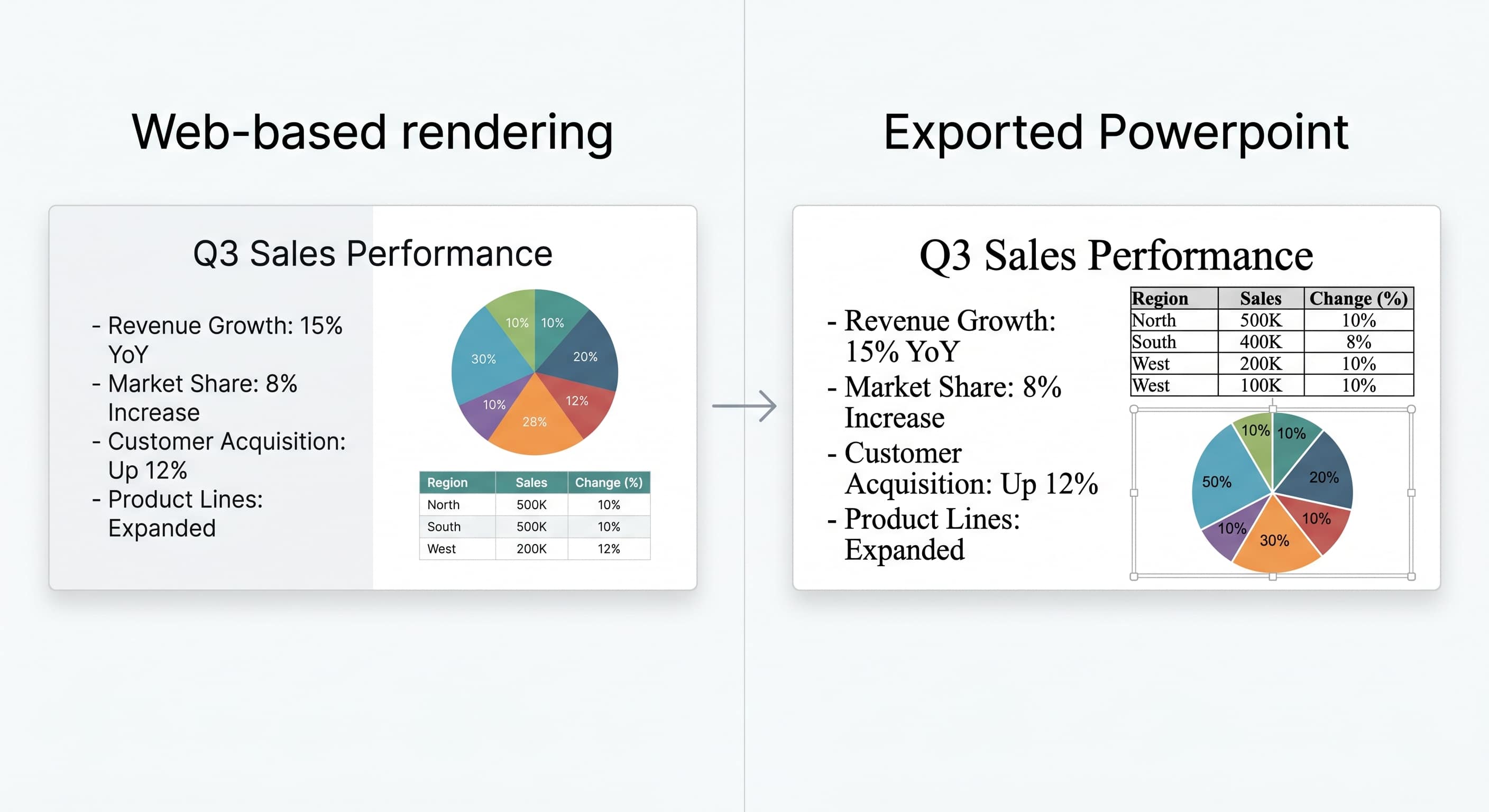
More critically, these tools cannot ingest your corporate .pptx template as the design source. They use their own themes. Your brand team's work - the slide masters, placeholder positions, chart color sequences, bullet indentation - is not part of the equation.
For a consulting firm or a bank producing client-facing materials, this is a non-starter.
Category 2: Built-in AI copilots
AI capabilities embedded directly inside PowerPoint. This solves the format problem - you are working in native .pptx - but introduces a different one: the AI is a black box that cannot be steered by your organisation's standards.
According to Poesius's enterprise report, Copilot for PowerPoint has a 23% success rate without extensive setup. One European bank reported that brand violations tripled after rollout, and adoption fell to 8%. The 2,000-character input limit is the primary complaint from consulting and finance users - you cannot encode a quarterly report's structure, tone, data requirements, and narrative logic in 300 words.
There is no mechanism to define a reusable workflow that carries your rules from one run to the next. Every generation starts from zero context. The AI knows nothing about what last quarter's deck looked like, what your mandatory slides are, or what tone your practice uses. As one practitioner put it: "Create a presentation about Q3 results" will produce generic garbage.
KPMG's own research points to the answer
What makes the KPMG AI Pulse Survey especially relevant here is not just its adoption data — it is the framework it proposes for making AI productive.
The survey's central finding is that the organisations extracting real value from AI share three characteristics:
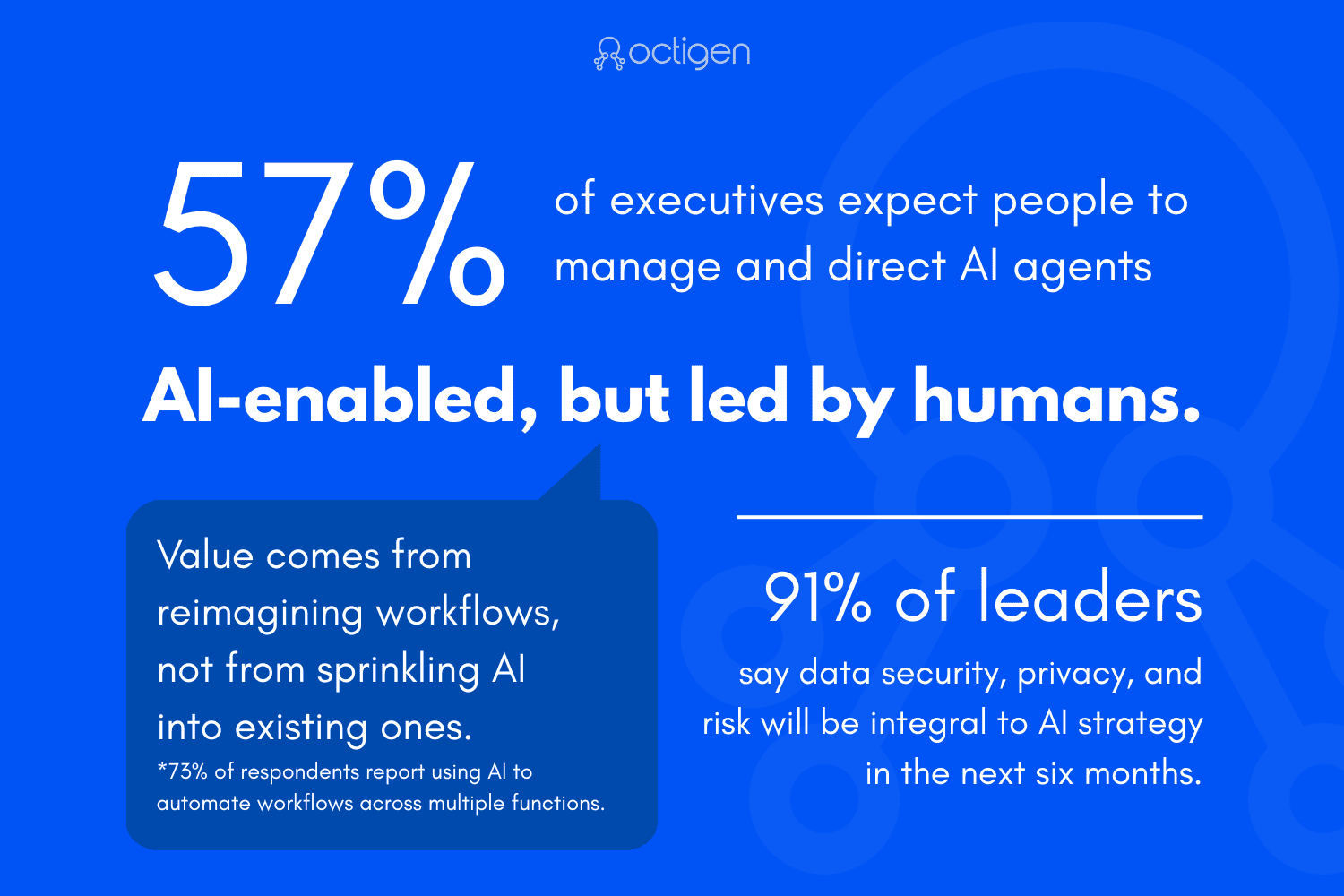
Human-directed AI. 57% of executives now expect people to manage and direct AI agents - not the reverse. The report describes the winning model as "AI-enabled but led by humans."
Enterprise-wide process reengineering. Value comes from reimagining workflows, not from sprinkling AI into existing ones. 73% of respondents report using AI to automate workflows across multiple functions.
Governance and controls as prerequisites. 91% of leaders say data security, privacy, and risk will be integral to AI strategy in the next six months. Trust is not a nice-to-have - it is what allows scaling.
These three principles - human direction, workflow-level automation, and embedded governance - are precisely what is missing from both categories of AI presentation tools described above.
Web-native generators give the AI the creative seat and leave humans to clean up. Built-in copilots offer no mechanism for organisational governance or workflow persistence. Neither lets the human be the architect while automating the mechanical work.
Our thesis: the solution is a platform, not a feature
We believe the right approach to AI-powered corporate presentations combines three architectural choices:
1. Native PowerPoint, not as an afterthought
Your .pptx template should be the starting point - not a format you export to at the end. The system should read the actual OOXML structure: slide masters, layouts, placeholders, chart styles, table formatting, paragraph inheritance chains. The output should be structurally identical to a hand-built deck because, architecturally, it was hand-built. The tool just filled it in.
This eliminates the reformatting tax entirely. Your brand team designs the template once. Every deck produced from it inherits that design precisely.
2. Configurable guardrails owned by your organisation
The AI should not be a black box. Your firm should define reusable workflows that specify: which slides appear and in what order, what tone the AI uses, what data sources feed which shapes, and what quality rules apply. These workflows encode your organisational knowledge - the institutional standards that make your output worth paying for.
This is the "human-directed AI" model that KPMG's research identifies as the key to extracting value. The human sets the strategy and constraints; the AI executes within them.
3. Deployment flexibility for data sovereignty
For firms handling sensitive client data - audit working papers, financial results, M&A materials - the question of where data lives is not optional. A SaaS-only tool that requires your data to leave your environment will face immediate resistance from IT and compliance.
The platform should be deployable behind your firewall, on your cloud infrastructure (AWS, Azure, GCP), or as a managed service with data residency guarantees. This maps directly to the governance imperative that 91% of leaders in KPMG's survey identify as integral to scaling AI.
What this means in practice
This thesis is not theoretical. We built Octigen to test it.
When a team uploads their corporate template, Octigen reads every slide, identifies every shape, and maps the formatting into a structural contract. When the AI generates content, it writes into defined placeholders - it does not create new elements or touch the layout. Charts and tables can be wired directly to data sources, bypassing the language model entirely for quantitative shapes.
Workflows carry all of this context from run to run. The same workflow that produced Q3 results produces Q4 results - same structure, same tone, same data wiring - with only fresh content and data swapped in.
The result is a deck that your colleagues cannot distinguish from one built by hand, produced in minutes instead of hours, with every run auditable and every constraint explicit.
Current limitations
This approach has trade-offs worth acknowledging.
Narrative text still goes through a language model and requires editorial review. If your team does not have a defined PowerPoint template, you will not benefit from the branding guarantees - the template is the foundation, not an optional add-on. And for very large templates with hundreds of slides, the system currently works best when the relevant slide set is scoped before generation - however we're already hard at work to resolve this gap for our clients.
These are engineering constraints we are actively working to remove, not architectural limitations.
The bottom line
The data is clear: enterprises are spending heavily on AI, but most have not achieved measurable productivity gains. Corporate presentations - a function that consumes enormous hours across professional services, finance, and consulting - remain largely untouched by effective AI automation.
The reason is not a lack of tools. It is a lack of tools that respect the three principles KPMG's own research identifies: human direction, workflow-level automation, and embedded governance.
We think the gap is closable. And we think the firms that close it first will have a significant operational advantage.
Octigen is a PowerPoint automation platform for enterprise teams. Learn more →
Sources
KPMG AI Quarterly Pulse Survey: Q1 2026 US · Global Pulse Q1 2026 · Q1 2026 News Release
Enterprise AI adoption: Presenc AI – Enterprise AI Adoption Statistics 2026 · iEnable – 73 AI Adoption Statistics
Productivity gap: The Register – 6,000 Execs Struggle to Find the AI Productivity Boom (Feb 2026) · Workday – Companies Are Leaving AI Gains on the Table (Jan 2026)
AI presentation tools: auxi.ai – Enterprise Guide for 2026 · Poesius – State of AI in Enterprise Presentations 2026 · 2Slides – Enterprise Tools Compared 2026
Research conducted May 2026.